
Introduction
Broken links are a common problem that can cause a lot of frustration. Broken links can negatively affect your site’s performance and user experience. Let’s discuss broken links, why they matter, and how you can fixthem to keep your website in top shape.
What Are Broken Links?
Simply put, a broken link (also known as a dead link) is a hyperlink on a web page that leads to a page that no longer exists or cannot be found. When you or your visitors click on a broken link, the server returns an error message, usually a "404 Not Found" error, indicating that the page is missing. Broken links can appear in many places:- Internal links: Links that connect different pages within your website.
- External links: Links that direct visitors to pages on other websites.
What are the Common Causes of Broken Links?
There are several reasons for brokenlinks, but the good news is that many of these issues are easy to fix once identified. Here are some of the most common causes:- Page Removed or Moved: One of the most frequent causes of broken links is when a page has been deleted or moved to another location without setting up a redirect. If a once-available page is no longer accessible, its link becomes broken.
- Incorrect URL: Typos or errors in the HTML code can lead to broken links. For example, an extra space or missing character in the URL can result in a link leading to a non-existent page.
- Changes in URL Structure: Websites often change, and sometimes, the structure of URLs may be updated. They will break if you don’t update the old links to reflect the new structure.
- External Sites Change or Shut Down: When you link to external websites, you rely on them to keep their content available. If an external website changes its structure, removes pages, or shuts down, your external links will break.
- Server Issues: Occasionally, the website you're linking to may experience temporary server problems, resulting in broken pages for a certain period.
- Firewall or Geo-Blocking: Sometimes, content on a page is restricted to certain locations or protected by a firewall, meaning that users in restricted regions will experience a dead link.
Why Are Broken Links a Problem?
Broken links may seem like a small issue, but they can impact your website more than you might realize. Here’s why broken links matter:
- Poor User Experience: When visitors click on a broken link, they are greeted with an error message instead of the expected content. This can frustrate them, leading to a poor user experience. Visitors who encounter too many broken links might leave your site altogether.
- SEO Impact: Search engines, like Google, prioritize websites that offer a good user experience. Broken links are seen as a sign of poor maintenance, hurting your rankings in Google search results. Too many broken links can waste your crawl budget, meaning search engines spend valuable resources trying to crawl pages that don’t exist instead of indexing useful content on your site.
- Loss of Credibility: When visitors encounter multiple dead links, it sends the message that your website is outdated or not properly maintained. This can damage your site’s credibility and reduce the trust that users and search engines have in your site.
- Wasted Link Equity: Links, especially backlinks, help pass authority from one page to another. If a link is broken, you miss out on the link equity that would have helped your site or page rank better in search engines.
How to Find Broken Links
Finding broken links is difficult, especially if your site has hundreds or thousands of pages. Fortunately, several tools can automatically detect broken links for you. Here are some of the most popular methods to find broken links:Using a Broken Link Checker
Link checkers are tools designed to scan your website and find broken links. These tools will help you identify both broken internal links and external links. Some popular free tools can help you to begin. For more comprehensive checks, paid tools like Ahrefs or Semrush can provide detailed reports of broken links.Google Search Console
If you’re using Google Search Console, you can easily find broken links on your site. Under the "Coverage" section, you'll find reports on 404 errors, which indicate that Google’s bots have found broken pages on your site. This tool is free and incredibly useful for site health monitoring. It provides a clear view of how Google sees your site, including any crawling or indexing issues.Using Screaming Frog
Screaming Frog is a powerful tool that can crawl all the pages on your site and flag any issues, including broken links. It’s perfect for large websites as it can handle massive amounts of data and allows you to export the results into a spreadsheet for easier management. The free version allows you to crawl up to 500 URLs, making it an excellent choice for smaller sites.Browser Extensions
Extensions can quickly scan a web page for broken links. While this method requires manual checking of each page, it’s helpful for smaller sites or when you want to check specific website sections.Manual Checking
Although time-consuming, manually clicking each link on your website is another way to check for dead links. This method is typically not recommended for large websites but can be useful if you only have a few pages to review.How to Fix Broken Links
If broken links exist, they can disrupt your website's functionality and negatively impact user experience, search engine rankings, and overall performance. Once you've identified broken links, addressing them promptly is important. Here are several methods to fix broken links depending on the cause:1. Update the Link
The simplest fix for a broken link is to update it. If a typo or an incorrect URL causes the broken link, you can correct it directly in your content management system (CMS) or HTML code. For example:- Check for missing characters or extra spaces in the URL.
- Ensure the URL includes the correct "https://" or "http://".
- Double-check that the page you’re linking to is still live and accessible.
2. Set Up 301 Redirects
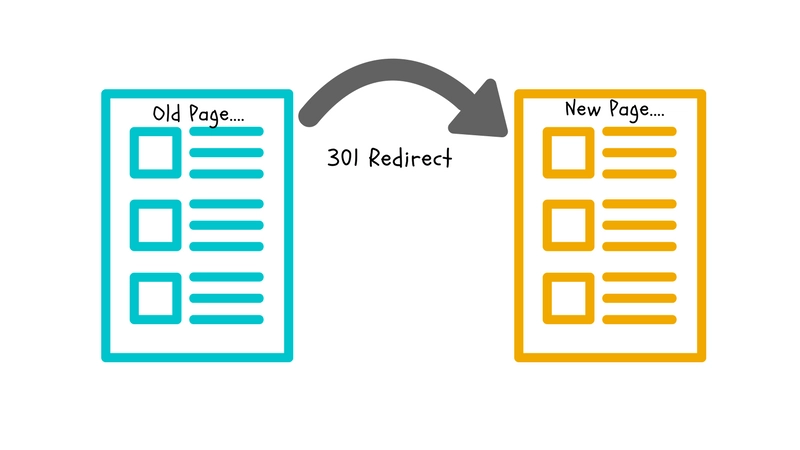 Sometimes, a page is no longer available because its URL has changed or it has been moved to a new location. In this case, setting up a 301 redirect is essential. A 301 redirect automatically sends users from the old, outdated URL to the new, updated one. This is particularly important for both internal and external links to:
 - Prevent users from landing on a "404 Not Found" error page.
- Preserve the SEO value and link equity of the old page.
3. Remove the Link
In some instances, the best solution is to simply remove the broken link. This is typically done when the content no longer exists or is not essential. For instance:- External links: If the page you’re linking to on another website has been permanently deleted, remove the link so that users don’t encounter dead links.
- Internal links: If the content is no longer relevant and there is no updated version, removing the link can clean up your site and prevent user frustration.
4. Replace with a Relevant Page
When a linked page is no longer available but a similar page provides equivalent value, replacing the broken link with a new, relevant page is an effective solution. This makes sure that your visitors continue to receive useful content, even if the original page is gone. For example, if a guide you linked to has been removed, but another guide on your site covers the same topic, update the link to point to the available resource. This maintains user satisfaction and prevents SEO issues related to broken links.5. Fix Plugin or Server Issues
Occasionally, broken links occur due to plugin malfunctions or server errors. If a plugin on your website is outdated or not functioning correctly, it may cause certain elements on your page, like links, to break. Similarly, server issues can result in pages becoming temporarily unavailable. Here’s how to address these problems:- Update or reinstall plugins: If a plugin is responsible for broken links, make sure it's updated to the latest version or find an alternative plugin that works properly.
- Resolve server issues: If your server is causing broken links, you may need to contact your web hosting provider for assistance or troubleshoot issues such as incorrect server settings.
- Fix HTML or JavaScript errors: Broken links caused by coding issues may require reviewing the page's HTML or JavaScript to identify and resolve errors.
How to Prevent Broken Links in the Future
Now that you know how to identify and fix broken links, it's important to take steps to prevent them from occurring in the future. Broken links can frustrate users and hurt your website's SEO. Here are some tips to help you maintain a link-healthy site:1. Perform Regular Link Audits
To avoid potential problems, make it a habit to run broken link checker tools on your website every few months. Tools like Google Search Console and Screaming Frog can help you detect broken links early on. Regular audits allow you to fix issues before they impact your website’s performance or user experience. You can catch dead links by routinely scanning your site before they become a bigger problem.2. Use Relative URLs for Internal Links
When linking to other pages within your website, use relative URLs (e.g., "/about-us") instead of full URLs (e.g., "https://www.example.com/about-us"). This approach helps avoid broken links if you change your domain or move your website to a new server. Relative URLs are less likely to break because they are not dependent on the domain name, making them more adaptable to your website’s structure changes.3. Set Up Redirects After Updates
When making significant changes to your site, such as altering your URL structure, deleting pages, or launching a new website, always set up 301 redirects for any pages that have been moved or removed. It makes sure that visitors and search engines are automatically directed to the correct live pages, even if they use old links. Redirects help preserve SEO value and prevent users from encountering broken pages.4. Check External Links Regularly
Since you don’t control external websites, reviewing external links periodically is a good idea. Links to other websites can become broken if the target site changes its structure, deletes pages, or goes offline. Use a free link checker or broken link tool to scan your site for dead external links. This proactive approach will help maintain a smooth user experience and avoid unnecessary 404 errors caused by external factors.5. Monitor Site Performance
Regularly monitor your website’s performance using tools like Google Search Console. This tool helps track how Google crawls and indexes your site, alerting you to issues such as an increase in 404 errors or crawling problems. By keeping an eye on your site’s performance, you can quickly take action to fix broken pages or links that may be harming your SEO or user experience.Broken Link Building: Turning Problems into Opportunities
Did you know that broken links can help your SEO? Broken link building is an SEO technique where you find broken links on other websites and suggest your content as a replacement. This not only helps the website owner fix their problem but also creates an opportunity for you to gain high-quality backlinks. Here’s how you can do it:
 - Identify Broken Links: Use tools like Ahrefs, Semrush, or Screaming Frog to find broken external links on websites in your industry.
- Create Relevant Content: Once you find a broken link, create or find relevant content on your website that matches the link’s topic.
- Reach Out to the Site Owner: Contact the site owner or webmaster and inform them about the broken link on their page. Politely suggest that they replace it with your relevant content, providing them with the URL.
- Get a Backlink: If they agree to the swap, you'll help the website owner fix their broken links and gain a valuable backlink in the process, which can boost your own site's authority.